 Built for WordPress administrators
See every API call.Fix problems faster.
API Analyzer turns outbound WordPress HTTP traffic into a clear, searchable diagnostic workspace—so you can identify failures, slow endpoints, and unexpected integrations without digging through server logs.
Local-first diagnostics • Essential analytics included free • Advanced privacy controls in Pro
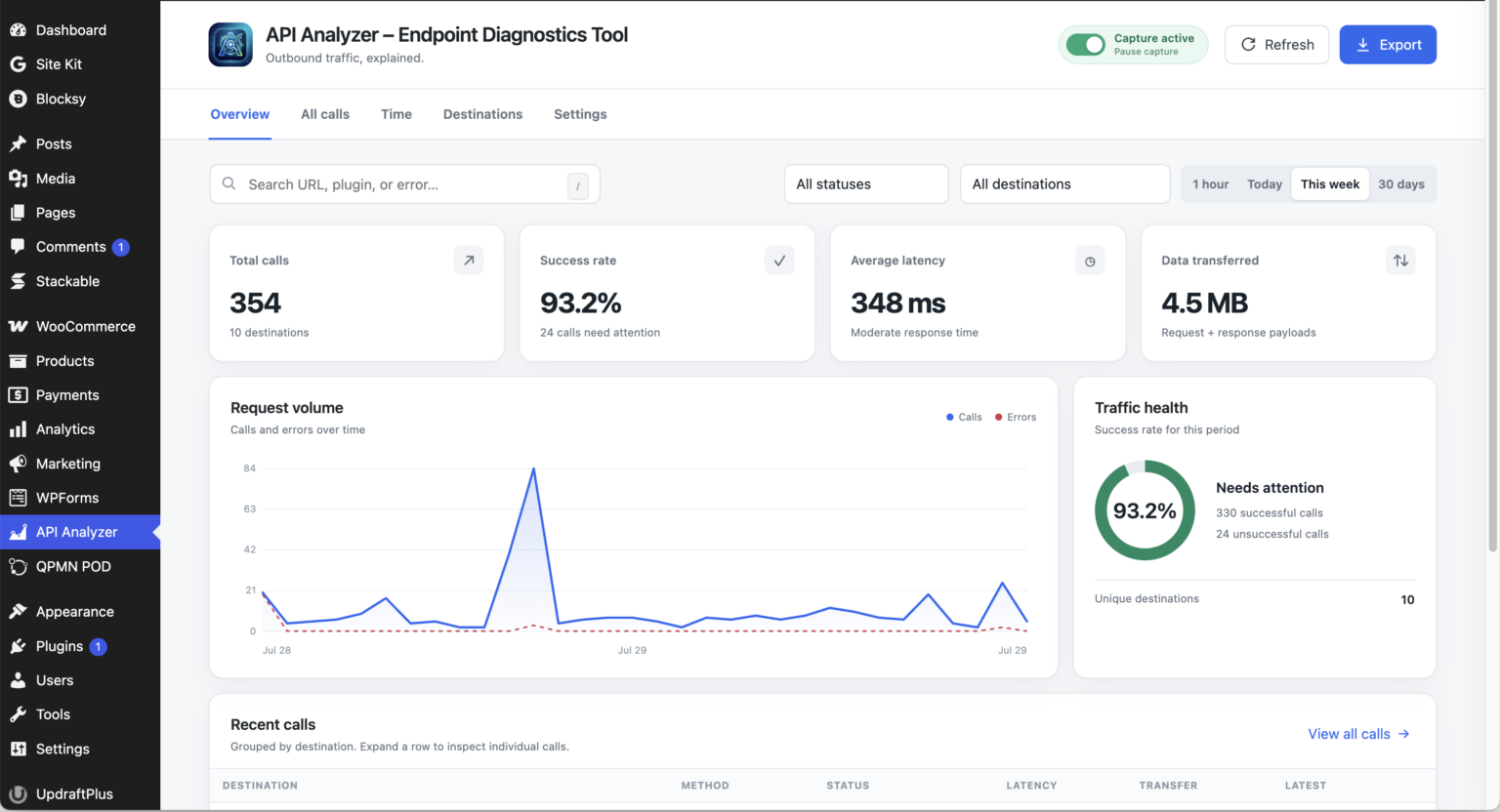
Clarity for outbound traffic
The missing observability layer for WordPress
When a payment, form, update, or integration fails, API Analyzer shows what WordPress sent, where it went, how long it took, and what came back.
Capture every HTTP API call
Observe third-party requests made through WordPress’s native HTTP API, including method, status, timing, payload size, and source.
Find the call that matters
Search URLs and plugins, filter by destination or status, and isolate success and error traffic in seconds.
Understand destination health
Group traffic by service to compare call volume, average latency, error rate, and last-seen activity.
Investigate in context
Review chronological activity across practical windows—from the last five minutes to a custom date range.
Protect sensitive diagnostics
Pro masks recognized keys, tokens, passwords, and signatures before diagnostic details are stored or exported.
Share a useful diagnostic
Export filtered logs and copy reproducible call details for developers, hosts, and integration support teams.
Built for real troubleshooting
From “something broke” to a concrete answer
See whether WordPress core, a theme, or a plugin initiated the request.
Grouped destinations keep repetitive traffic organized while preserving every individual call.
Status, latency, transfer size, and timeline views make unusual behavior obvious.
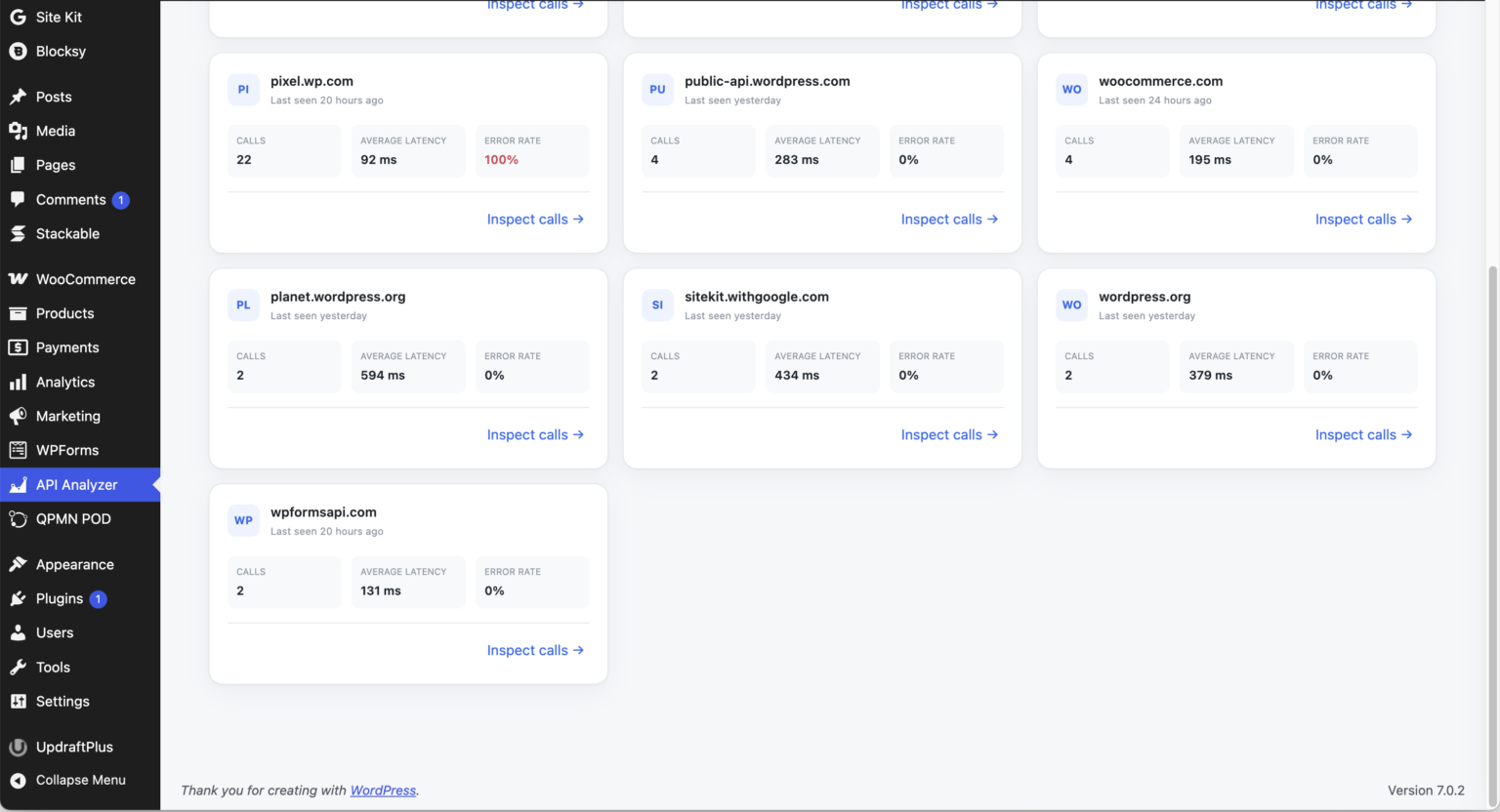
Filterable call history with status, latency, transfer size, and destination privacy controls.
A faster diagnostic workflow
Observe. Isolate. Resolve.
Capture
Install and activate. Capture starts on by default and can be paused instantly from the dashboard.
Isolate
Narrow calls by time, destination, source, and result. Expand grouped traffic only when you need the detail.
Resolve
Inspect the protected request, copy a diagnostic, or export the filtered evidence for the right support team.
Choose your visibility
Start free. Upgrade when diagnostics become mission-critical.
The free edition covers essential troubleshooting. Pro adds the privacy, retention, and performance tools needed by agencies and serious store operators.
API Analyzer
Essential outbound API diagnostics for every WordPress administrator.
Free edition • WordPress.org release in progress
Release details- Outbound call capture and pause control
- Overview analytics and destination groups
- Search, status, destination, and time filters
- Detailed request and response inspection
API Analyzer Pro
Advanced privacy and performance intelligence for stores and agencies.
Launch-sale price • One website • One-year license
- Everything in the free edition
- Credential masking before storage
- Filtered CSV and JSON exports
- Speed insights and latency distribution
- Slowest destinations and response thresholds
- Protected destination redaction or hiding
- Extended log retention controls
- License activation and priority updates
| Feature | Free | Pro |
|---|---|---|
| Outbound HTTP API capture | ✓ | ✓ |
| Grouped destinations and call detail | ✓ | ✓ |
| Status, destination, search, and time filters | ✓ | ✓ |
| Credential masking | — | PRO |
| Filtered CSV / JSON exports | — | PRO |
| Speed insights and slow-call analysis | — | PRO |
| Protected destination redaction and hiding | — | PRO |
| Extended log retention | — | PRO |
Advanced privacy in API Analyzer Pro
Professional controls for sensitive diagnostics
Captured data stays in your WordPress database. Pro adds credential masking before storage, protected destinations, and controlled diagnostic exports.
Mask before storage
In Pro, recognized API keys, tokens, passwords, authorization values, and signatures retain only safe diagnostic fragments.
You control retention
Set the retention window, limit body size, pause capture, ignore destinations, or clear captured data from settings.
No telemetry
The plugin does not send your captured API-call data to a third-party analytics service or require a hosted analytics account.
Frequently asked questions
Straight answers before you install
What traffic does API Analyzer capture?
It observes outbound requests made through the WordPress HTTP API. Direct socket calls, browser-side JavaScript requests, and traffic that bypasses WordPress’s HTTP layer are outside its capture path.
Does it store usable API keys?
API Analyzer Pro masks recognized credentials before storage. The first three and last three characters may be retained for diagnostics, while complete recognized credentials are not intentionally stored by the Pro masking workflow.
Will it slow down my website?
The capture path is designed to remain lightweight, with bounded payload storage and database indexes for the dashboard. Retention controls prevent logs from growing indefinitely.
What becomes available in Pro?
Pro unlocks speed insights, protected destination redaction or hiding, longer-term retention controls, and commercial licensing. Free and Pro are built from one maintained codebase.
Is there a money-back guarantee?
Yes. API Analyzer Pro includes a 30-day money-back guarantee. Contact support within 30 days of the original purchase to request a refund.
How is the Pro license delivered?
After a successful purchase, you receive access to the Pro download and a license key for one WordPress website. The license provides Pro activation, updates, and support for one year.
Stop guessing what WordPress is calling.
Give administrators, developers, and support teams the evidence they need to solve API failures with confidence.